
How do I declare and initialize an array in Java?
30 Answers
You can either use array declaration or array literal (but only when you declare and affect the variable right away, array literals cannot be used for re-assigning an array).
For primitive types:
int[] myIntArray = new int[3];
int[] myIntArray = {1, 2, 3};
int[] myIntArray = new int[]{1, 2, 3};

// Since Java 8. Doc of IntStream: https://docs.oracle.com/javase/8/docs/api/java/util/stream/IntStream.html

int [] myIntArray = IntStream.range(0, 100).toArray(); // From 0 to 99
int [] myIntArray = IntStream.rangeClosed(0, 100).toArray(); // From 0 to 100
int [] myIntArray = IntStream.of(12,25,36,85,28,96,47).toArray(); // The order is preserved.
int [] myIntArray = IntStream.of(12,25,36,85,28,96,47).sorted().toArray(); // Sort
For classes, for example String, it's the same:
String[] myStringArray = new String[3];
String[] myStringArray = {"a", "b", "c"};
String[] myStringArray = new String[]{"a", "b", "c"};
The third way of initializing is useful when you declare an array first and then initialize it, pass an array as a function argument, or return an array. The explicit type is required.
String[] myStringArray;
myStringArray = new String[]{"a", "b", "c"};
Type[] variableName = new Type[capacity];

Type[] variableName = {comma-delimited values};


Type variableName[] = new Type[capacity];

Type variableName[] = {comma-delimited values};
is also valid, but I prefer the brackets after the type, because it's easier to see that the variable's type is actually an array.
There are various ways in which you can declare an array in Java:
float floatArray[]; // Initialize later
int[] integerArray = new int[10];
String[] array = new String[] {"a", "b"};
You can find more information in the Sun tutorial site and the JavaDoc.
I find it is helpful if you understand each part:
Type[] name = new Type[5];
Type[] is the type of the variable called name ("name" is called the identifier). The literal "Type" is the base type, and the brackets mean this is the array type of that base. Array types are in turn types of their own, which allows you to make multidimensional arrays like Type[][] (the array type of Type[]). The keyword new says to allocate memory for the new array. The number between the bracket says how large the new array will be and how much memory to allocate. For instance, if Java knows that the base type Type takes 32 bytes, and you want an array of size 5, it needs to internally allocate 32 * 5 = 160 bytes.
You can also create arrays with the values already there, such as
int[] name = {1, 2, 3, 4, 5};
which not only creates the empty space but fills it with those values. Java can tell that the primitives are integers and that there are 5 of them, so the size of the array can be determined implicitly.
Alternatively,
// Either method works
String arrayName[] = new String[10];
String[] arrayName = new String[10];
That declares an array called arrayName of size 10 (you have elements 0 through 9 to use).
Also, in case you want something more dynamic there is the List interface. This will not perform as well, but is more flexible:
List<String> listOfString = new ArrayList<String>();

listOfString.add("foo");
listOfString.add("bar");

String value = listOfString.get(0);
assertEquals( value, "foo" );
If by "array" you meant using java.util.Arrays, you can do it like this:
List<String> number = Arrays.asList("1", "2", "3");

Out: ["1", "2", "3"]
This one is pretty simple and straightforward.
Declaration
One Dimensional Array
int[] nums1; // best practice
int []nums2;
int nums3[];
Multidimensional array
int[][] nums1; // best practice
int [][]nums2;
int[] []nums3;
int[] nums4[];
int nums5[][];
Declaration and Initialization
One Dimensional Array
With default values
int[] nums = new int[3]; // [0, 0, 0]

Object[] objects = new Object[3]; // [null, null, null]
With array literal
int[] nums1 = {1, 2, 3};
int[] nums2 = new int[]{1, 2, 3};

Object[] objects1 = {new Object(), new Object(), new Object()};
Object[] objects2 = new Object[]{new Object(), new Object(), new Object()};
With loop for
int[] nums = new int[3];
for (int i = 0; i < nums.length; i++) {
    nums[i] = i; // can contain any YOUR filling strategy
}

Object[] objects = new Object[3];
for (int i = 0; i < objects.length; i++) {
    objects[i] = new Object(); // can contain any YOUR filling strategy
}
With loop for and Random
int[] nums = new int[10];
Random random = new Random();
for (int i = 0; i < nums.length; i++) {
    nums[i] = random.nextInt(10); // random int from 0 to 9
}
With Stream (since Java 8)
int[] nums1 = IntStream.range(0, 3)
                       .toArray(); // [0, 1, 2]
int[] nums2 = IntStream.rangeClosed(0, 3)
                       .toArray(); // [0, 1, 2, 3]
int[] nums3 = IntStream.of(10, 11, 12, 13)
                       .toArray(); // [10, 11, 12, 13]
int[] nums4 = IntStream.of(12, 11, 13, 10)
                       .sorted()
                       .toArray(); // [10, 11, 12, 13]
int[] nums5 = IntStream.iterate(0, x -> x <= 3, x -> x + 1)
                       .toArray(); // [0, 1, 2, 3]
int[] nums6 = IntStream.iterate(0, x -> x + 1)
                       .takeWhile(x -> x < 3)
                       .toArray(); // [0, 1, 2]

int size = 3;
Object[] objects1 = IntStream.range(0, size)
        .mapToObj(i -> new Object()) // can contain any YOUR filling strategy
        .toArray(Object[]::new);

Object[] objects2 = Stream.generate(() -> new Object()) // can contain any YOUR filling strategy
        .limit(size)
        .toArray(Object[]::new);
With Random and Stream (since Java 8)
int size = 3;
int randomNumberOrigin = -10;
int randomNumberBound = 10
int[] nums = new Random().ints(size, randomNumberOrigin, randomNumberBound).toArray();
Multidimensional array
With default value
int[][] nums = new int[3][3]; // [[0, 0, 0], [0, 0, 0], [0, 0, 0]]

Object[][] objects = new Object[3][3]; // [[null, null, null], [null, null, null], [null, null, null]]
With array literal
int[][] nums1 = {
        {1, 2, 3},
        {4, 5, 6},
        {7, 8, 9}
};
int[][] nums2 = new int[][]{
        {1, 2, 3},
        {4, 5, 6},
        {7, 8, 9}
};

Object[][] objects1 = {
        {new Object(), new Object(), new Object()},
        {new Object(), new Object(), new Object()},
        {new Object(), new Object(), new Object()}
};
Object[][] objects2 = new Object[][]{
        {new Object(), new Object(), new Object()},
        {new Object(), new Object(), new Object()},
        {new Object(), new Object(), new Object()}
};
With loop for
int[][] nums = new int[3][3];
for (int i = 0; i < nums.length; i++) {
    for (int j = 0; j < nums[i].length; i++) {
        nums[i][j] = i + j; // can contain any YOUR filling strategy
    }
}

Object[][] objects = new Object[3][3];
for (int i = 0; i < objects.length; i++) {
    for (int j = 0; j < nums[i].length; i++) {
        objects[i][j] = new Object(); // can contain any YOUR filling strategy
    }
}
There are a lot of answers here. I am adding a few tricky ways to create arrays (from an exam point of view it's good to know this)
Declare and define an array
int intArray[] = new int[3];This will create an array of length 3. As it holds a primitive type, int, all values are set to 0 by default. For example,
intArray[2]; // Will return 0Using box brackets [] before the variable name
int[] intArray = new int[3];
intArray[0] = 1;  // Array content is now {1, 0, 0}
Initialise and provide data to the array
int[] intArray = new int[]{1, 2, 3};This time there isn't any need to mention the size in the box bracket. Even a simple variant of this is:
int[] intArray = {1, 2, 3, 4};An array of length 0
int[] intArray = new int[0];
int length = intArray.length; // Will return length 0
Similar for multi-dimensional arrays
int intArray[][] = new int[2][3];
// This will create an array of length 2 and
//each element contains another array of length 3.
// { {0,0,0},{0,0,0} }
int lenght1 = intArray.length; // Will return 2
int length2 = intArray[0].length; // Will return 3
Using box brackets before the variable:
int[][] intArray = new int[2][3];
It's absolutely fine if you put one box bracket at the end:
    int[] intArray [] = new int[2][4];
    int[] intArray[][] = new int[2][3][4]
Some examples
    int [] intArray [] = new int[][] {{1,2,3},{4,5,6}};
    int [] intArray1 [] = new int[][] {new int[] {1,2,3}, new int [] {4,5,6}};
    int [] intArray2 [] = new int[][] {new int[] {1,2,3},{4,5,6}}
    // All the 3 arrays assignments are valid
    // Array looks like {{1,2,3},{4,5,6}}
It's not mandatory that each inner element is of the same size.
    int [][] intArray = new int[2][];
    intArray[0] = {1,2,3};
    intArray[1] = {4,5};
    //array looks like {{1,2,3},{4,5}}

    int[][] intArray = new int[][2] ; // This won't compile. Keep this in mind.
You have to make sure if you are using the above syntax, that the forward direction you have to specify the values in box brackets. Else it won't compile. Some examples:
    int [][][] intArray = new int[1][][];
    int [][][] intArray = new int[1][2][];
    int [][][] intArray = new int[1][2][3];
Another important feature is covariant
    Number[] numArray = {1,2,3,4};   // java.lang.Number
    numArray[0] = new Float(1.5f);   // java.lang.Float
    numArray[1] = new Integer(1);    // java.lang.Integer
   // You can store a subclass object in an array that is declared
   // to be of the type of its superclass.
   // Here 'Number' is the superclass for both Float and Integer.

   Number num[] = new Float[5]; // This is also valid
IMPORTANT: For referenced types, the default value stored in the array is null.
An array has two basic types.
Static Array: Fixed size array (its size should be declared at the start and can not be changed later)
Dynamic Array: No size limit is considered for this. (Pure dynamic arrays do not exist in Java. Instead, List is most encouraged.)
To declare a static array of Integer, string, float, etc., use the below declaration and initialization statements.
int[] intArray = new int[10];
String[] intArray = new int[10];
float[] intArray = new int[10];

// Here you have 10 index starting from 0 to 9
To use dynamic features, you have to use List... List is pure dynamic Array and there is no need to declare size at beginning. Below is the proper way to declare a list in Java -
ArrayList<String> myArray = new ArrayList<String>();
myArray.add("Value 1: something");
myArray.add("Value 2: something more");With local variable type inference you only have to specify the type once:
var values = new int[] { 1, 2, 3 };
Or
int[] values = { 1, 2, 3 }
An array can contain primitives data types as well as objects of a class depending on the definition of the array. In case of primitives data types, the actual values are stored in contiguous memory locations. In case of objects of a class, the actual objects are stored in the heap segment.
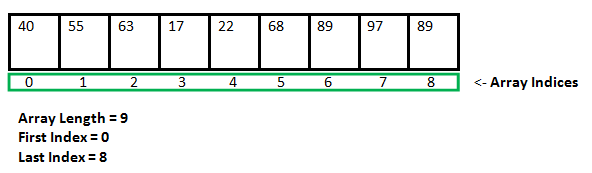
One-Dimensional Arrays:
The general form of a one-dimensional array declaration is
type var-name[];
OR
type[] var-name;
Instantiating an Array in Java
var-name = new type [size];
For example,
int intArray[];  // Declaring an array
intArray = new int[20];  // Allocating memory to the array

// The below line is equal to line1 + line2
int[] intArray = new int[20]; // Combining both statements in one
int[] intArray = new int[]{ 1, 2, 3, 4, 5, 6, 7, 8, 9, 10 };

// Accessing the elements of the specified array
for (int i = 0; i < intArray.length; i++)
    System.out.println("Element at index " + i + ": "+ intArray[i]);
Ref: Arrays in Java
int[] x = new int[enter the size of array here];
Example:
int[] x = new int[10];
Or
int[] x = {enter the elements of array here];
Example:
int[] x = {10, 65, 40, 5, 48, 31};
Declare Array: int[] arr;
Initialize Array: int[] arr = new int[10]; 10 represents the number of elements allowed in the array
Declare Multidimensional Array: int[][] arr;
Initialize Multidimensional Array: int[][] arr = new int[10][17]; 10 rows and 17 columns and 170 elements because 10 times 17 is 170.
Initializing an array means specifying the size of it.
One another full example with a movies class:
public class A {

    public static void main(String[] args) {

        class Movie {

            String movieName;
            String genre;
            String movieType;
            String year;
            String ageRating;
            String rating;

            public Movie(String [] str)
            {
                this.movieName = str[0];
                this.genre = str[1];
                this.movieType = str[2];
                this.year = str[3];
                this.ageRating = str[4];
                this.rating = str[5];
            }
        }

        String [] movieDetailArr = {"Inception", "Thriller", "MovieType", "2010", "13+", "10/10"};

        Movie mv = new Movie(movieDetailArr);

        System.out.println("Movie Name: "+ mv.movieName);
        System.out.println("Movie genre: "+ mv.genre);
        System.out.println("Movie type: "+ mv.movieType);
        System.out.println("Movie year: "+ mv.year);
        System.out.println("Movie age : "+ mv.ageRating);
        System.out.println("Movie  rating: "+ mv.rating);
    }
}
package com.examplehub.basics;

import java.util.Arrays;

public class Array {

    public static void main(String[] args) {
        int[] numbers = {1, 2, 3, 4, 5};

        /*
         * numbers[0] = 1
         * numbers[1] = 2
         * numbers[2] = 3
         * numbers[3] = 4
         * numbers[4] = 5
         */
        System.out.println("numbers[0] = " + numbers[0]);
        System.out.println("numbers[1] = " + numbers[1]);
        System.out.println("numbers[2] = " + numbers[2]);
        System.out.println("numbers[3] = " + numbers[3]);
        System.out.println("numbers[4] = " + numbers[4]);

        /*
         * Array index is out of bounds
         */
        //System.out.println(numbers[-1]);
        //System.out.println(numbers[5]);


        /*
         * numbers[0] = 1
         * numbers[1] = 2
         * numbers[2] = 3
         * numbers[3] = 4
         * numbers[4] = 5
         */
        for (int i = 0; i < 5; i++) {
            System.out.println("numbers[" + i + "] = " + numbers[i]);
        }

        /*
         * Length of numbers = 5
         */
        System.out.println("length of numbers = " + numbers.length);

        /*
         * numbers[0] = 1
         * numbers[1] = 2
         * numbers[2] = 3
         * numbers[3] = 4
         * numbers[4] = 5
         */
        for (int i = 0; i < numbers.length; i++) {
            System.out.println("numbers[" + i + "] = " + numbers[i]);
        }

        /*
         * numbers[4] = 5
         * numbers[3] = 4
         * numbers[2] = 3
         * numbers[1] = 2
         * numbers[0] = 1
         */
        for (int i = numbers.length - 1; i >= 0; i--) {
            System.out.println("numbers[" + i + "] = " + numbers[i]);
        }

        /*
         * 12345
         */
        for (int number : numbers) {
            System.out.print(number);
        }
        System.out.println();

        /*
         * [1, 2, 3, 4, 5]
         */
        System.out.println(Arrays.toString(numbers));


        String[] company = {"Google", "Facebook", "Amazon", "Microsoft"};

        /*
         * company[0] = Google
         * company[1] = Facebook
         * company[2] = Amazon
         * company[3] = Microsoft
         */
        for (int i = 0; i < company.length; i++) {
            System.out.println("company[" + i + "] = " + company[i]);
        }

        /*
         * Google
         * Facebook
         * Amazon
         * Microsoft
         */
        for (String c : company) {
            System.out.println(c);
        }

        /*
         * [Google, Facebook, Amazon, Microsoft]
         */
        System.out.println(Arrays.toString(company));

        int[][] twoDimensionalNumbers = {
                {1, 2, 3},
                {4, 5, 6, 7},
                {8, 9},
                {10, 11, 12, 13, 14, 15}
        };

        /*
         * total rows  = 4
         */
        System.out.println("total rows  = " + twoDimensionalNumbers.length);

        /*
         * row 0 length = 3
         * row 1 length = 4
         * row 2 length = 2
         * row 3 length = 6
         */
        for (int i = 0; i < twoDimensionalNumbers.length; i++) {
            System.out.println("row " + i + " length = " + twoDimensionalNumbers[i].length);
        }

        /*
         * row 0 = 1 2 3
         * row 1 = 4 5 6 7
         * row 2 = 8 9
         * row 3 = 10 11 12 13 14 15
         */
        for (int i = 0; i < twoDimensionalNumbers.length; i++) {
            System.out.print("row " + i + " = ");
            for (int j = 0; j < twoDimensionalNumbers[i].length; j++) {
                System.out.print(twoDimensionalNumbers[i][j] + " ");
            }
            System.out.println();
        }

        /*
         * row 0 = [1, 2, 3]
         * row 1 = [4, 5, 6, 7]
         * row 2 = [8, 9]
         * row 3 = [10, 11, 12, 13, 14, 15]
         */
        for (int i = 0; i < twoDimensionalNumbers.length; i++) {
            System.out.println("row " + i + " = " + Arrays.toString(twoDimensionalNumbers[i]));
        }

        /*
         * 1 2 3
         * 4 5 6 7
         * 8 9
         * 10 11 12 13 14 15
         */
        for (int[] ints : twoDimensionalNumbers) {
            for (int num : ints) {
                System.out.print(num + " ");
            }
            System.out.println();
        }

        /*
         * [1, 2, 3]
         * [4, 5, 6, 7]
         * [8, 9]
         * [10, 11, 12, 13, 14, 15]
         */
        for (int[] ints : twoDimensionalNumbers) {
            System.out.println(Arrays.toString(ints));
        }


        int length = 5;
        int[] array = new int[length];
        for (int i = 0; i < 5; i++) {
            array[i] = i + 1;
        }

        /*
         * [1, 2, 3, 4, 5]
         */
        System.out.println(Arrays.toString(array));

    }
}
Sometimes I use this for initializing String arrays:
private static final String[] PROPS = "lastStart,storetime,tstore".split(",");
It reduces the quoting clutter at the cost of a more expensive initialization.
It's very easy to declare and initialize an array. For example, you want to save five integer elements which are 1, 2, 3, 4, and 5 in an array. You can do it in the following way:
a)
int[] a = new int[5];
or
b)
int[] a = {1, 2, 3, 4, 5};
so the basic pattern is for initialization and declaration by method a) is:
datatype[] arrayname = new datatype[requiredarraysize];
datatype should be in lower case.
So the basic pattern is for initialization and declaration by method a is:
If it's a string array:
String[] a = {"as", "asd", "ssd"};
If it's a character array:
char[] a = {'a', 's', 'w'};
For float double, the format of array will be same as integer.
For example:
double[] a = {1.2, 1.3, 12.3};
but when you declare and initialize the array by "method a" you will have to enter the values manually or by loop or something.
But when you do it by "method b" you will not have to enter the values manually.
Related