What are extension methods in .NET?
EDIT: I have posted a follow up question at Usage of Extension Methods
What are extension methods in .NET?
EDIT: I have posted a follow up question at Usage of Extension Methods
Extension methods allow developers to add new methods to the public contract of an existing CLR type, without having to sub-class it or recompile the original type.
Extension Methods help blend the flexibility of "duck typing" support popular within dynamic languages today with the performance and compile-time validation of strongly-typed languages.
Reference: http://weblogs.asp.net/scottgu/archive/2007/03/13/new-orcas-language-feature-extension-methods.aspx
Here is a sample of an Extension Method (notice the this keyword infront of the first parameter):
public static bool IsValidEmailAddress(this string s)
{
    Regex regex = new Regex(@"^[\w-\.]+@([\w-]+\.)+[\w-]{2,4}$");
    return regex.IsMatch(s);
}
Now, the above method can be called directly from any string, like such:
bool isValid = "so@mmas.com".IsValidEmailAddress();
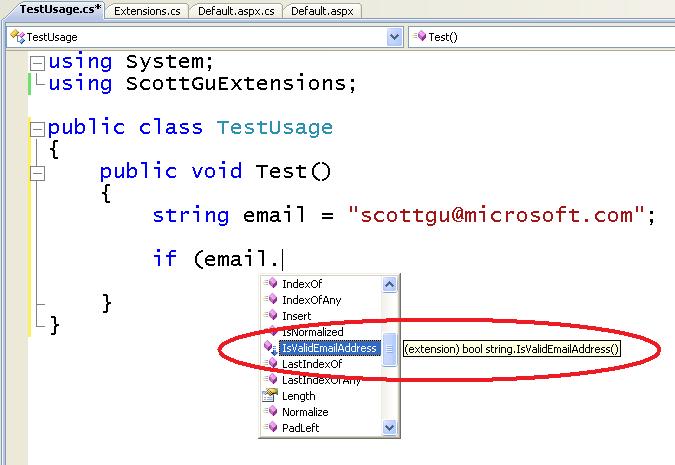
The added methods will then also appear in IntelliSense:

(source: scottgu.com)
As regards a practical use for Extension Methods, you might add new methods to a class without deriving a new class.
Take a look at the following example:
public class Extended {
    public int Sum() {
        return 7+3+2;
    }
}

public static class Extending {
    public static float Average(this Extended extnd) {
        return extnd.Sum() / 3;
    }
}
As you see, the class Extending is adding a method named average to class Extended. To get the average, you call average method, as it belongs to extended class:
Extended ex = new Extended();

Console.WriteLine(ex.average());
Extension methods are ways for developers to "add on" methods to objects they can't control.
For instance, if you wanted to add a "DoSomething()" method to the System.Windows.Forms object, since you don't have access to that code, you would simply create an extension method for the form with the following syntax.
Public Module MyExtensions

    <System.Runtime.CompilerServices.Extension()> _
    Public Sub DoSomething(ByVal source As System.Windows.Forms.Form)
        'Do Something
    End Sub

End Module
Now within a form you can call "Me.DoSomething()".
In summary, it is a way to add functionality to existing objects without inheritance.
An extension method is a "compiler trick" that allows you to simulate the addition of methods to another class, even if you do not have the source code for it.
For example:
using System.Collections;
public static class TypeExtensions
{
    /// <summary>
    /// Gets a value that indicates whether or not the collection is empty.
    /// </summary>
    public static bool IsEmpty(this CollectionBase item)
    {
        return item.Count == 0;
    }
}
In theory, all collection classes now include an IsEmpty method that returns true if the method has no items (provided that you've included the namespace that defines the class above).
If I've missed anything important, I'm sure someone will point it out. (Please!)
Naturally, there are rules about the declaration of extension methods (they must be static, the first parameter must be preceeded by the this keyword, and so on).
Extension methods do not actually modify the classes they appear to be extending; instead, the compiler mangles the function call to properly invoke the method at run-time. However, the extension methods properly appear in intellisense dropdowns with a distinctive icon, and you can document them just like you would a normal method (as shown above).
Note: An extension method never replaces a method if a method already exists with the same signature.
Here's the example in VB.Net; notice the Extension() attribute. Place this in a Module in your project.
Imports System.Runtime.CompilerServices
<Extension()> _
Public Function IsValidEmailAddress(ByVal s As String) As Boolean
    If String.IsNullOrEmpty(s) Then Return False

    Return Regex.IsMatch(email, _
         "^([\w-\.]+)@((\[[0-9]{1,3}\.[0-9]{1,3}\.[0-9]{1,3}\.)|(([\w-]+\.)+))([a-zA-Z]{2,4}|[0-9]{1,3})(\]?)$")
End Function
Extension method is the technique thru which we can add method to existing data type. Below is the example how we can add methods to existing data type.
Code:
public static class ExtensionMethods
{
    public static int WordCount(this string str)
    {
        return str.Split(' ').Count();
    }

    public static int LongestWord(this string str)
    {
        return str.Split(' ').Select(x =>
                x.Length).OrderByDescending(y =>
                y).FirstOrDefault();
    }
}
Code:
public static void Main(String[] args)
{
    string str = "this is my name    punit";
    int i = str.LongestWord();
}
Key points:
extension method class need to be static
extension method's first argument will have this keyword and that method should also be static
Extension methods are special kind of static methods. It allows us to add method in existing type without modifying that existing type. E.g. If you have Customer class and you need to add one more method in it without modification in Customer class, For such scenarios we have extension methods. refer this link for more examples https://princesid85.wixsite.com/website/home/you-ve-been-holding-your-pen-wrong-your-entire-life
This question has already been answered, but I'd like to add that it is very useful if you've got types that are within another project and you don't want to go back to that project in order to add some functionality. We're using NHibernate and have a project for our data persistence layer that the guys want to keep clean. In order to get nice and discoverable additional methods onto those object I was able to use extension methods and it really brightened my day.
Also, since no one else has posted it, here's a good article about it on MSDN - http://msdn.microsoft.com/en-us/library/bb383977.aspx
Sometimes we want to add our own additional functionalities to a type and use them as usual instance methods on that type. If we would have the source code, we could easily add new functionality without creating extension methods. But problem occurs when we do not have source code & still want to add and call additional functionality as instance methods on a type; extension methods serve this purpose of adding our own functionalities to a type & use them as instance methods on the type when source code is unavailable.
When we want to add our own functionality, we can even create a separate static class and call its static methods in our code instead of creating extension methods, but problem with that can be code readability.
LINQ benefits greatly from extension methods.
They can be really helpful at the time of Development, when the required methods are easily available using Intellisense to multiple developers; while with static methods we would have to write className.MethodName() every time in our code.
/// <summary>
/// External Library Code
/// </summary>
namespace ExternalLibrary
{
    public class Calculator
    {
        public int Number1 { get; set; }
        public int Number2 { get; set; }

        public int Addition()
        {
            return Number1 + Number2;
        }

        public int Subtraction()
        {
            return Number1 - Number2;
        }
    }
}
using ExternalLibrary;
using System;

namespace StackOverFlow
{
    class Program
    {
        static void Main(string[] args)
        {
            Calculator calc = new Calculator()
            {
                Number1 = 5,
                Number2 = 3
            };
            Console.WriteLine(calc.Addition());
            Console.WriteLine(calc.Subtraction());

            // Here we want multiplication also. but we don't have access Calculator
            // class code, so we can't modify in that.
            // In order to achieve this functionality we can use extension method.
            Console.WriteLine(calc.Multiplication());

            Console.ReadLine();
        }
    }

    /// <summary>
    /// Extension Method for multiplication
    /// </summary>
    public static class CalculatorExtension
    {
        public static int Multiplication(this Calculator calc)
        {
            return calc.Number1 * calc.Number2;
        }
    }
}