
I have a WooCommerce product with a service I sell all year, but I offer to purchase said service only up to three months from now (eg: September (current), October and November). The product also has 4 variations.
I created a shortcode to calculate and show said months in order to automate displaying the months the user can purchase the service, but I can't use it inside the variation name, it just shows plain text.
So for now, I've only been able to get the variations and show my shortcode next to the variation names for a given month using the code below:
// shortcode
function get_mes_anio( $attr ) {
   date_default_timezone_set( 'America/Argentina/Catamarca' );
   setlocale( LC_TIME, 'es_ES', 'Spanish_Spain', 'Spanish' );

   $args = shortcode_atts( array (
       'cant' => '0',
   ), $attr );

   $mes_anio = ucwords( utf8_encode( strftime( "%B %Y", strtotime( $args['cant'] . " months" ) ) ) );

   return $mes_anio;
}
add_shortcode( 'prox_meses', 'get_mes_anio' );
Using [prox_meses cant="2"] prints Noviembre 2022 (two months from now).
To show that information next to my variations I'm using the code below:
// get variations for a given product ID and shows the above shortcode
function display_price_in_variation_options( $term, $term_obj ) {

   $product = wc_get_product();
   $id = $product->get_id();
   if ( empty( $term ) || empty( $id ) ) {
       return $term;
   }
   if ( $product->is_type( 'variable' ) && $product->get_id() === 30917 ) {
       $product_variations = $product->get_available_variations();
   } else {
       return $term;
   }

   foreach ( $product_variations as $variation ) {
       if ( count( $variation['attributes'] ) > 1 ) {
           return $term;
       }
       $attribute = array_values( $variation['attributes'] )[0];

       if ( $attribute === $term_obj->slug ) {
           $term .= ' (' . do_shortcode('[prox_meses cant="2"]') . ')';
       }
   }
   return $term;
}
add_filter( 'woocommerce_variation_option_name', 'display_price_in_variation_options', 10, 2 );
This is what I get: https://i.ibb.co/wyJdYbq/Untitled.png
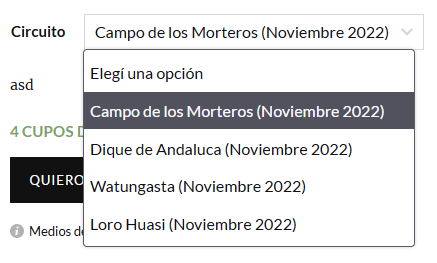
The code automates everything for a given month, but as I said, I need to do it for three months every 4 variations so it would look like this: https://i.ibb.co/YQw741T/1-Untitled.png

I'm thinking about two solutions (after creating the missing 8 variations):
- Allow shortcodes to properly display inside a variation name.
- Calculate and change the month every 4th variation.
But I don't know how to get any of them working.